 HelloMona
One photo. Main-character energy.
Burning Bridges AI Video Generator
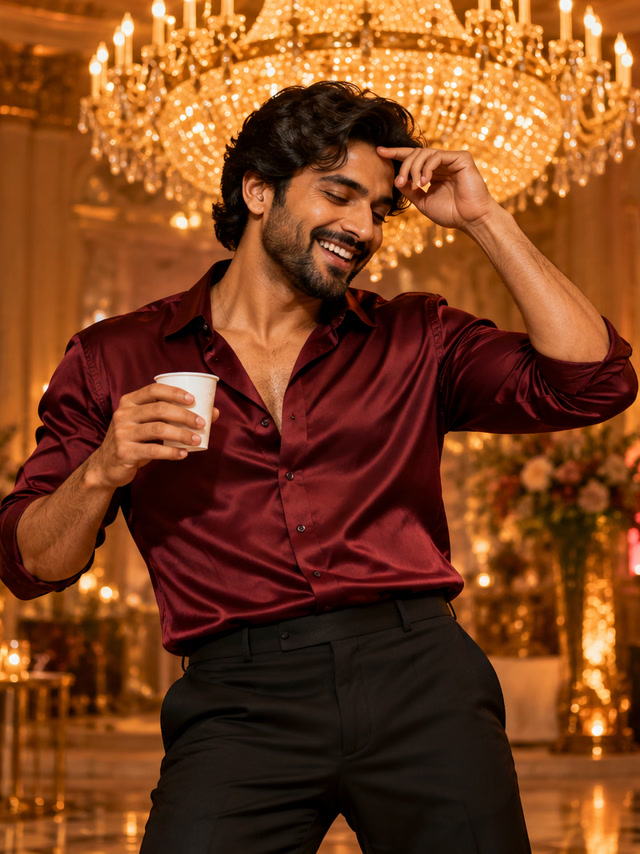
Your face. Your party moment. Turn one portrait into an eight-second, chandelier-lit reaction: cover your face, raise a cup and give the camera a wave.
See the result
480p · 8sReference photos used for this example
Your party reaction
Actual Seedance 2.0 Mini output using fictional adult reference portraits. An original AI reinterpretation; likeness and motion can vary.
Original scene ambience only. Add the trending sound in your social app when you share.
Create your Burning Bridges AI party video
Make your version in three steps
- Choose the reference photo for each role. Use a clear face, good light and an unobstructed upper body.
- Choose your model and frame, check the credit quote and confirm permission to use the photos.
- Generate, then return to this page to play and download your saved MP4. Add your platform sound when posting.
Made for your next post
Your take on the trend
Put yourself in a recognizable scene with no filming or prompt writing.
A group-chat surprise
Make a playful remix with a friend who has agreed to take part.
Ready for your feed
Choose a vertical frame for Reels and Shorts, or a wide frame for a shared screen.
What is the Burning Bridges AI trend?
For this tool, the Burning Bridges AI trend means a personalized party-reaction video: the main guest covers their face, raises a cup and waves toward the camera. Warm chandeliers and a lively room set the mood. Your reference portrait guides the guest in a newly generated scene. This is useful when you want the party-meme format with your own appearance without filming a performance. Watch the public example and compare its reference portrait with the result before spending credits. The page shows the actual output of this recipe so you can assess its gestures, camera movement and visual style.
How to make a Burning Bridges AI video
Upload one clear adult portrait with the face and upper body visible. A front-facing or gently turned head is a practical starting point for the face-cover and wave gestures. Choose the frame and an available model variant, review the quoted credits and confirm permission to use the photo. The template supplies the party scene; no custom prompt is needed. After generation, watch the complete eight-second clip and inspect the face as the hand passes in front of it. Check the cup and waving hand too, because small objects and fingers may vary. Download the MP4 when you are happy with the result.
Burning Bridges AI lyrics, songs and original clips
Some searches for Burning Bridges AI are about a song, lyrics or an artist-associated video rather than a photo generator. This page makes a visual party interpretation; it does not provide lyrics, a song download, voice cloning or the original performance. The generated MP4 uses scene ambience. If you want to post it with a platform sound, add that sound in your social app after downloading and check its timing against the reaction. The tool is independent of the artist. A reference to the trend does not mean endorsement or permission to reuse an existing recording, and available platform sounds can differ by account and region.
Choose a portrait for the party reaction
The face-cover sequence briefly hides part of the face. Give the model a clear reference rather than starting with a photo that already obscures the subject.
- Pick one adult with visible shoulders and an unobstructed face. Avoid group shots and heavy beauty filters that remove facial detail.
- A simple background is fine. You do not need a party photograph or a cup in the source image; the template generates the room and props.
- Preview the full result before sharing, especially the hand crossing the face. A new generation is a separate paid attempt, so review your current result first.
Before you make your video
What is the Burning Bridges AI effect?
This effect reinterprets the party-reaction trend associated with Burning Bridges. Your photo becomes the lead guest in an original chandelier-lit scene, with a face-cover, cup raise and wave. It is independent of the artist and does not use the original recording.
Is this a free Burning Bridges AI video generator?
The public demo is free to watch. Creating your own Burning Bridges AI video requires a signed-in account and enough credits for the selected model. The quote appears before submission; no fixed number of free personal videos is promised.
Is generation free?
Watching the public example is free. Personal generation requires an account and credits. The current model and variant quote appears before you submit; confirmed failures return credits automatically.
Does it include the original song or footage?
No. This tool creates a new interpretation with original scene ambience. It does not include the source song, artist voice or original footage. You can add a platform sound in your social app. Exact movement and likeness vary.
Who can see my photos and result?
Your reference photos are sent to the configured video provider. Task results are saved privately and delivered only to their signed-in owner. Public examples use separately prepared fictional adults. Download your result for your own backup.
How long is the video, and what if I leave the page?
The recipe creates an eight-second MP4 in vertical or landscape format. Generation can take several minutes. Your saved task continues processing and appears in recent videos when you return. A confirmed failure refunds its credits.
Product information maintained by HelloMona · Last reviewed: · Contact